
LinkOpsAfrica

Built here. Run by you.

LinkOpsAfrica

The Operating System
for Modern ISPs

FTTH and community Wi-Fi in one platform, run by your operator, owned by you.

Network, subscribers, money and operators — brought into one operation on your own hardware. Bespoke deployment. An affordable approach built around your network.

Built today, with a clear roadmap for what comes next.

One operationYour infrastructure
The operating systemLinkOps AfricaYour operator at the controls
01NetworkAccess · addresses · devices
02SubscribersOnboard · provision · confirm
03MoneyCatalogue · vouchers · books
04OperatorsDuties · reasons · audit trail
Your serverYour databaseYour data
Platform scope diagram. Available capabilities and roadmap are distinguished below.
A licensed deployment. An operation of your own.How you get it

Control is the point

Your ISP should
belong to you.

You own the infrastructure and the record of what happened. Your contracted operator runs the day. The platform brings the work together.

01 / Sovereign

Your deployment.
Your way out.

Deploy on your own server or in your own namespace, with your own database. Keep control of your records and exports when your engagement ends.

Configure your own Sage company for accounting previews. Production posting is roadmap. External network and finance integrations remain explicit parts of your deployment.
02 / Audited by construction

The change and its record
succeed together.

Subscriber, catalogue and location changes write their outcome audit in the same database transaction. If that record cannot be written, the change fails closed.

A typed reason records why. Publishing commercial terms, approving payments and refunds, closing a billing period and changing money settings need an admin; recording a payment and requesting a refund sit with finance or admin. Read-only access does not grant permission to act.

03 / Operator-run

Put your operator
at the controls.

A contracted operator can onboard subscribers, provision paid fibre orders, confirm live service, manage vouchers and prepare catalogue changes from the console. Admins publish terms and manage operator invites.

Suspending and resuming a service, and pausing or resuming billing, are console actions. A few operator tools still run from the command line, among them the policy projection rebuild, ghost-identity removal and the Sage chart pull. As-built KML and KMZ files are imported from the console.

See what gets recorded

A service is live.
And there is a reason why.

Confirm live records the operator's attestation today: what they saw on the network. Automatic network confirmation is roadmap.

Outcome recordIllustrative fixture
Event
order.live
Actor
Demo operator · provision duty
Reason
Session up; service verified on the demo connection.
Confirmation
Operator attestation
One transaction: order change + subscriber history + audit. If any write fails, none commits. A simplified example, not a live console screenshot.

From connection to operation

One platform.
The whole ISP in view.

Each card says what is built today and what is still roadmap. Your network and finance integrations are commissioned and verified during deployment.

Built · operator-attested

Bring a subscriber into service.

Create the subscriber, add a connection, provision a paid fibre order and confirm live only after the operator has seen it working.

Built + roadmap

Sell fibre and community access together.

Residential and prepaid community products share a versioned catalogue. Recurring billing runs and the recurring FTTH sign-up journey (subscriber, connection, subscription) are built; live payment settlement is roadmap.

Built + roadmap

Reach the cash market.

Mint voucher batches and print codes once, with a reason and an audit trail. Retailer and agent registers with declared commission terms are built; agent sign-in, stock, sales and receipts are roadmap.

Built + roadmap

Join access to its address space.

RADIUS/PPPoE policy and IPAM are built. Allocate prefixes and VLANs with a history. IPoE access is roadmap.

Built · commissioning required

Know the device at the other end.

Manage ONT records, placement and versioned service profiles. Placements queue their push to the ACS. Sending, and the read-back that checks each setting on the ONT afterwards, are switched on per deployment once they are proven on your network.

Built

Give each community its own front door.

Publish a branded portal for each location. Preview changes, publish an immutable theme version and roll back with a record of why.

Built + roadmap

Keep the books explainable.

Run billing and revenue recognition, open and close periods, record payments for admin approval and request refunds for a second approval, and inspect journal postings. Netcash configuration and Sage Intacct mapping previews are built; live Netcash settlement and Sage posting are roadmap.

Built + roadmap

Connect the desk to the field.

Record field visits, walk tests and power measurements, and acknowledge alerts. An Android field app for installers is built and being proven on the bench: it scans a label, shows the asset and its path towards the OLT, and records where it was placed. The ticket workflow and complete NOC alerting are roadmap.

See the console

Your operation
on one screen.

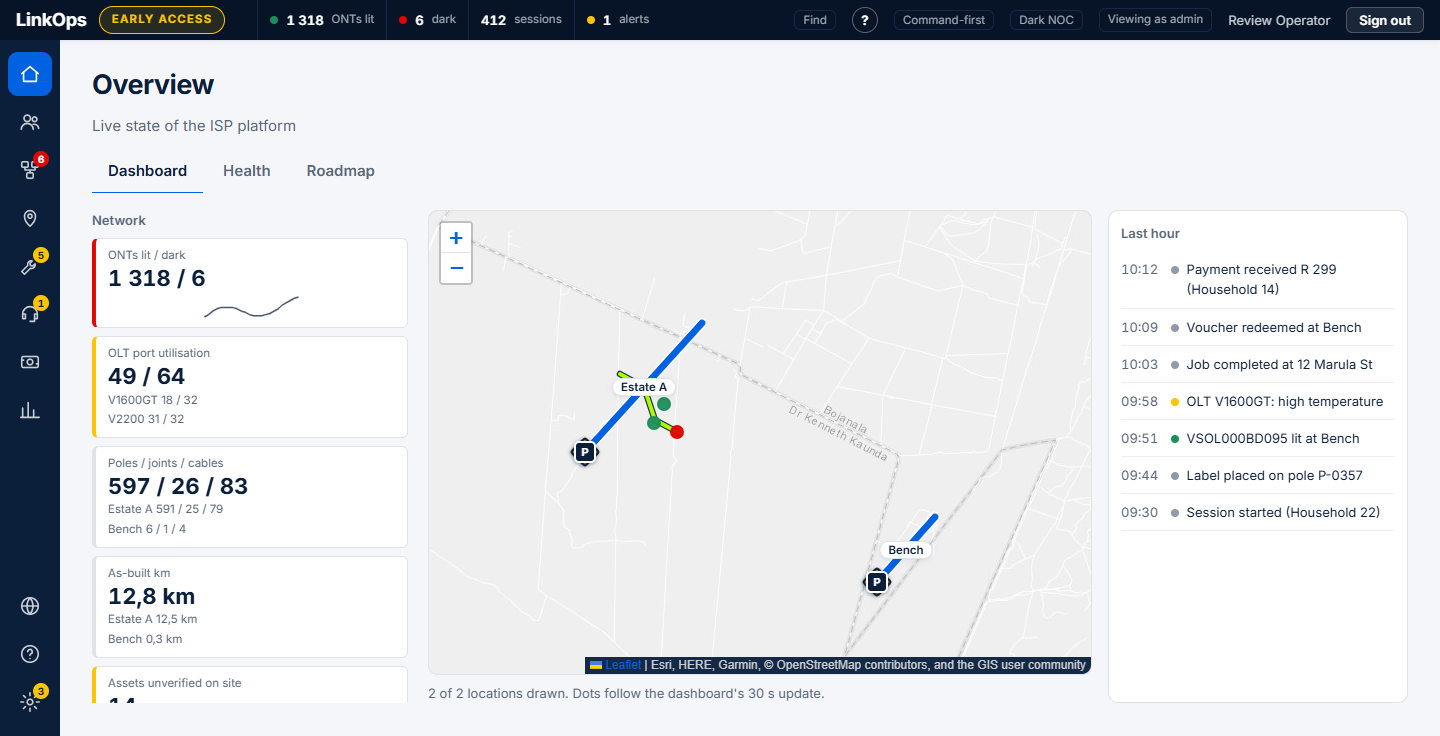
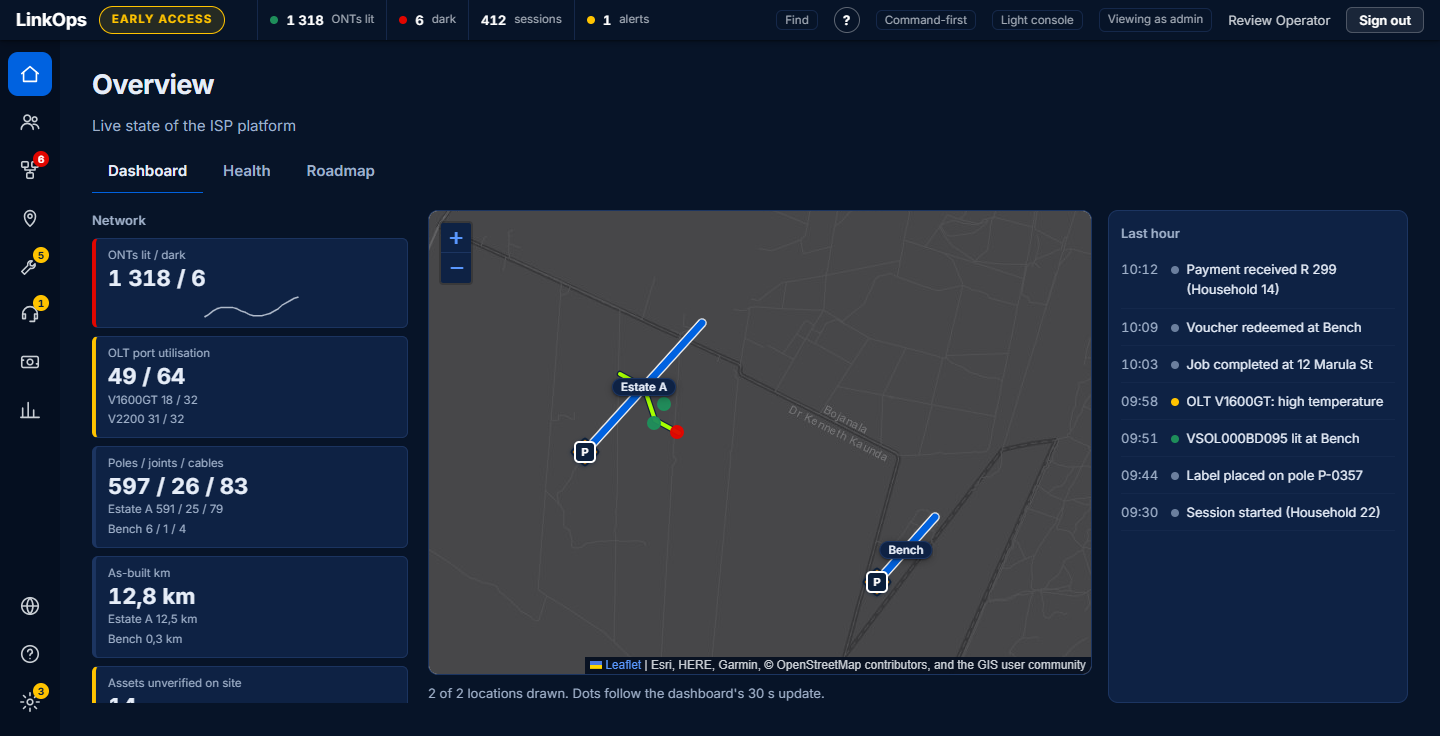
The Overview dashboard gathers network, service, money and operations into tiles that each open the page behind them, beside a live map of your locations and the last hour's events. It draws a tile only for a figure your deployment reports, so a figure that is missing is left out, never shown as zero. It comes in a light and a dark theme.

The LinkOps Africa console Overview dashboard in the light theme: tiles for network, service, money and operations, a map of two locations with ONTs shown as green and red dots, and a list of the last hour's events.
Illustrative dataLight theme. Demonstration figures on a test deployment, not a customer's network.
The same dashboard in the dark theme, for a wall screen or a night shift.
Illustrative dataDark theme. The same demonstration figures.

An operator's day

A queue becomes
a connection.

A walkthrough adapted from the existing operator help playbooks. Open each step to see the work, the permission and the evidence.

01Put the subscriber on the books.

Choose New subscriber. Check possible duplicates, pick the premise and type the reason. A subscriber alone cannot authenticate: a service needs its own credentials and plan.

Operator duty · subscriber history and audit commit with the change.

02Provision. Then confirm what you saw.

Choose a paid order awaiting provisioning. Provision the connection, then verify service on the network. Confirm live records the operator's attestation; provisioning alone never tells the subscriber they are connected.

Operator duty · typed reason · order.provisioned → order.live.

03Prepare the next community offer.

Prepare a versioned catalogue draft and preview its terms. An admin publishes it. Existing published versions stay readable, so what someone bought does not silently change.

Operator prepares · admin publishes · immutable product version.

04Leave a record the next shift can follow.

Read the subscriber's History for who changed what and why. An admin can inspect the full audit trail, including refusals. Inspect billing and reconciliation separately; today's payment provider is simulated.

History for operators · full audit for admins · no invented payment acceptance.

Local by design

Built in Africa

The local network, the local books and the conditions your crews work in belong in the same conversation.

ZAR
Catalogue and accounting amounts are recorded in rand.
Netcash
Chosen local payment integration. Configuration and verification are built; live settlement is roadmap.
Sage Intacct
Your company and account mapping. Journal previews today; production posting is roadmap.
Power-aware field work
Record power measurements and outage evidence. Automated load-shedding response is roadmap.
RICA-aware CGNAT
Roadmap: subscriber attribution and retention for shared addresses. No RICA compliance certification is claimed.

From a working network, not a sales deck

Built close to
the work.

Developed around real FTTH and community Wi-Fi operations.

Today's platform combines built operator journeys with real-network bench work. End-to-end production operation on these networks is still being proven.

We will walk through what works today, what needs commissioning on your network, and what remains on the roadmap.

How you get it

A deployment engagement.
An operation you own.

License LinkOps Africa for your network. Deploy on your hardware, or infrastructure we provide in a data centre. A contracted operator runs the operation.

  1. 01

    Scope the operation.

    Map your access network, catalogue, accounting and operator responsibilities. Agree what is ready and what needs work.

  2. 02

    Deploy your platform.

    Set up the server or namespace, database and integrations for your deployment.

  3. 03

    Onboard your operator.

    Walk the console journeys, assign duties and practise the exceptions and handovers.

  4. 04

    Prove it. Go live.

    Verify service, finance and operational evidence on your network before each capability goes live.

Let's walk your operation.

Bring your network questions. We'll bring the console.

Book a walkthrough